
瀑布流的多种实践
2024-07-25 17:04:03510
可实现方案:flex弹性布局;column多行布局;js计算的两种方案
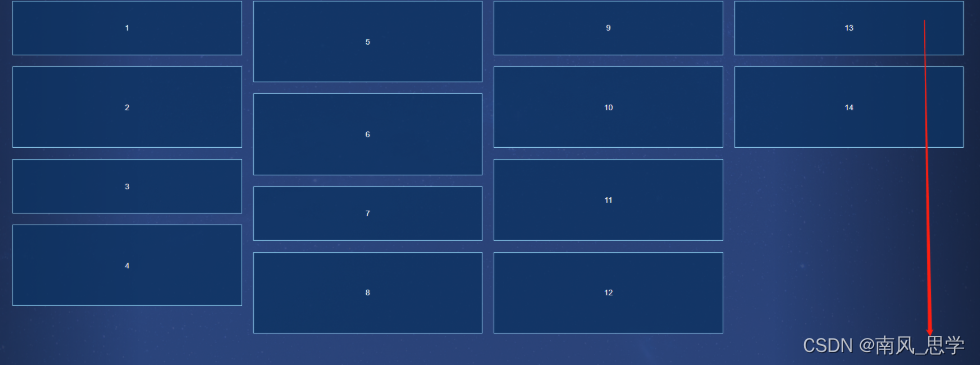
1、flex弹性布局;
将外层父元素设置display:横向布局 ,再设置 flex-flow:column wrap 纵向布局且换行即可
 .container {
    width: 100%;
    height: 70vh;
    display: flex;
    flex-flow: column wrap;

    .item {
      width: calc((100% - 60px) / 4);
      height: 10vh;
      background: rgba(12, 50, 97, 0.8);
      border: 1px solid #9cdeff;
      color: #fff;
      margin: 10px;
      display: flex;
      justify-content: center;
      align-items: center;

      &:nth-of-type(2n),
      &:nth-of-type(5),
      &:nth-of-type(11) {
        height: 15vh;
      }
    }
2.column多行布局;
column 实现瀑布流主要依赖两个属性。 一个是 column-count 属性,是分为多少列。 一个是 column-gap 属性,是设置列与列之间的距离。
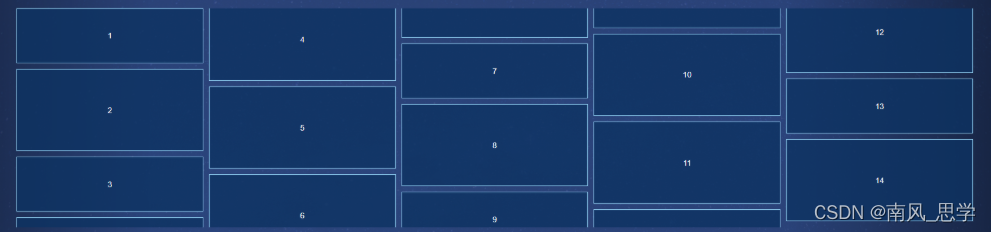
注意防止断点,否则dom会显示不全。
  .container {
    width: 100%;
    column-count: 5
    column-gap: 10px;

    .item {
      height: 10vh;
      background: rgba(12, 50, 97, 0.8);
      border: 1px solid #9cdeff;
      color: #fff;
      display: flex;
      justify-content: center;
      align-items: center;
      margin-bottom: 10px;

      break-inside: avoid; /*防止断点*/

      &:nth-of-type(2n),
      &:nth-of-type(5),
      &:nth-of-type(11) {
        height: 15vh;
      }
    }
  }
}
未设置:break-inside: avoid:
设置break-inside: avoid后:
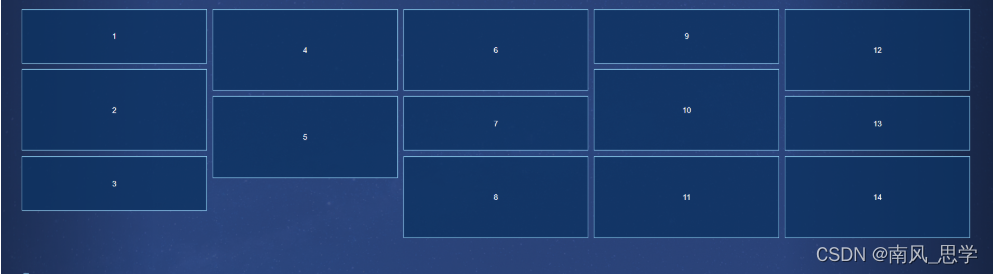
对于将文字分列展示挺合适:

3.js计算
无论是flex还是column,用css写瀑布流,每一块都是从上往下排列,不能做到从左到右排列,并且不会识别哪一块图片放在哪个地方合适,对于需要动态添加数据的情况效果并不好。
我们可以通过用JS 计算来解决,我们先来看一种方案:
思路分析
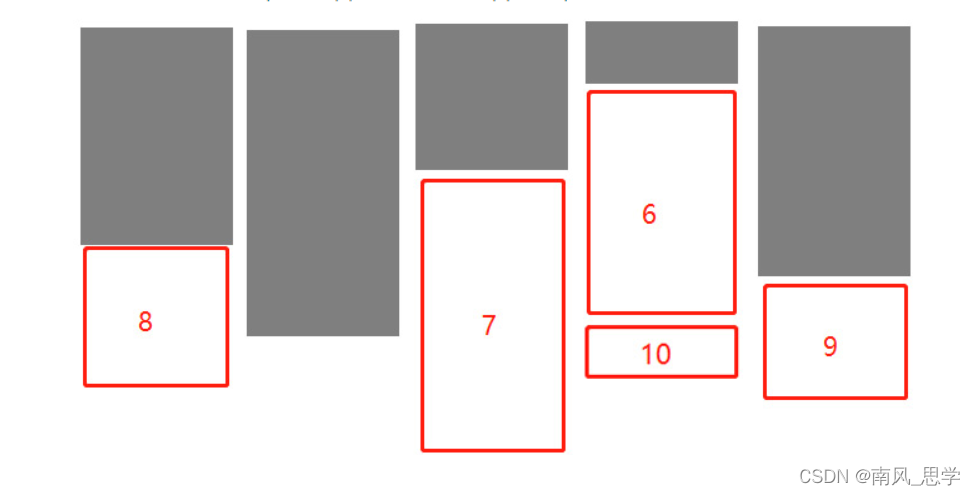
瀑布流布局的特点是等宽不等高。
为了让最后一行的差距最小,从第二行开始,需要将图片放在第一行最矮的图片下面,以此类推。
父元素设置为相对定位,图片所在元素设置为绝对定位。然后通过设置 top 值和 left 值定位每个元素。
<script type="text/javascript">
 2     // 定义瀑布流算法函数
 3     function fall() {
 4         const minGap = 20; // 最小间距,让每一列的最小空隙可以自定义,避免太过拥挤的情况发生。但是,会通过计算得到真实的间距。
 5         const itemWidth = 300; // 每一项的宽度,即当前每一个图片容器的宽度。保证每一列都是等宽不等高的。
 6         const scrollBarWidth = getScrollbarWidth();    // 获取滚动条的宽度
 7         const pageWidth = window.innerWidth - scrollBarWidth; // 获取当前页面的宽度 = window.innerWidth - 滚动条的宽度
 8         const column = Math.floor(pageWidth / (itemWidth + minGap)); // 实际列数=页面宽度/(图片宽度+最小间距)
 9         const gap = (pageWidth - itemWidth * column) / column/2; // 计算真实间距 = (页面宽度- 图片宽度*实际列数)/实际列数/2
10         const items = document.querySelectorAll('img'); // 获取所有的外层元素
11         const heightArr = []; // 定义一个空数组,保存最低高度。
12
13         // 获取滚动条的宽度
14         function getScrollbarWidth() {
15             const oDiv = document.createElement('div');//创建一个div
16             // 给div设置样式。随便定义宽高,只要能获取到滚动条就可以
17             oDiv.style.cssText = `width: 50px;height: 50px;overflow: scroll;`
18             document.body.appendChild(oDiv);//把div添加到body中
19             const scrollbarWidth = oDiv.offsetWidth - oDiv.clientWidth;// 使最大宽度和可视宽度相减,获得到滚动条宽度。
20             oDiv.remove();//移除创建的div
21             return scrollbarWidth;//返回滚动条宽度
22         }
23
24
25         for (let i = 0; i < items.length; i++) {
26             // 遍历所有的外层容器
27             const height = items[i].offsetHeight;
28             // 如果当前处在第一行
29             if (i < column) {
30                 // 直接设置元素距离上部的位置和距离左边的距离。
31                 items[i].style.cssText = `top: ${gap}px;left: ${(itemWidth + gap) * i + gap}px`;
32                 // 保存当前元素的高度。
33                 heightArr.push(height);
34             } else {
35                 // 不是第一行的话,就进行比对。
36                 let minHeight = heightArr[0]; // 先保存第一项的高度
37                 let minIndex = 0; // 保存第一项的索引值
38                 for (let j = 0; j < heightArr.length; j++) {
39                     // 通过循环遍历比对,拿到最小值和最小值的索引。
40                     if (minHeight > heightArr[j]) {
41                         minHeight = heightArr[j];
42                         minIndex = j;
43                     }
44                 }
45                 // 通过最小值为当前元素设置top值,通过索引为当前元素设置left值。
46                 items[i].style.cssText = `top: ${minHeight + gap *2}px; left: ${(itemWidth + gap) * minIndex + gap}px`;
47                 // 并修改当前索引的高度为当前元素的高度
48                 heightArr[minIndex] = minHeight + gap + height;
49             }
50         }
51     }
52     // 页面加载完成调用一次。
53     window.onload = fall;
54     // 页面尺寸发生改变再次调用。
55     window.onresize = fall;
56 </script>下一篇 没有了!